Reference
Pipeline configuration
Fields, defaults, command behavior, and limitations of .radial/pipeline.json.
.radial/pipeline.json declares the stages and gate names used to record a
build. Keep it in version control. Run build commands from the repository root:
the CLI reads the file relative to the current working directory.
- pipeline.jsonDeclareStage ids, positions, gate ids, tiers
- Agent + CLIExecuteStart stages and run named checks
- Issue buildRecordAttempts, results, evidence, sessions
For a complete example with a failing check and a retry, follow Implement a workflow with Radial.
Initialize and inspect
radial build pipeline init
radial build pipeline show
radial build pipeline show --json
init writes the shipped configuration only when the file does not exist. It
leaves an existing file unchanged. show displays the effective configuration,
its source (shipped or repo), and its SHA-256 hash. With --json, the result
is an object whose pipeline property contains the resolved configuration.
Neither command opens a build or runs a check.
Default configuration
When the file is absent, the CLI uses:
{
  "version": 1,
  "stages": [
    { "id": "plan", "position": 0 },
    { "id": "prototype", "position": 1, "optional": true },
    { "id": "materialize", "position": 2 },
    { "id": "build", "position": 3 },
    { "id": "verify", "position": 4 }
  ],
  "gates": [
    { "id": "validate", "tiers": ["T0", "T1", "T2", "T3"] },
    { "id": "unit", "tiers": ["T1", "T2", "T3"] },
    { "id": "e2e", "tiers": ["T2", "T3"] },
    { "id": "review", "tiers": ["T1", "T2", "T3"] },
    { "id": "browse", "tiers": ["T1", "T2", "T3"] }
  ]
}
Fields
| Field | Shape | Behavior |
|---|---|---|
version | Number; use 1 | Defaults to the shipped version when omitted. Included in the configuration hash; it does not select a different execution engine. |
stages | Array of stage objects | Replaces the entire shipped stage list when supplied. Defaults to the shipped list when omitted. |
gates | Array of gate objects | Replaces the entire shipped gate list when supplied. Defaults to the shipped list when omitted. |
Stage objects
| Field | Shape | Behavior |
|---|---|---|
id | String | Identifier passed to radial build stage. Use stable, unique ids. |
position | Number | Default recorded position when the stage starts. Use distinct nonnegative integers. This is display order, not a prerequisite rule. |
optional | Boolean; defaults to false in the hash | Declares optionality. The CLI does not use this field to enforce whether a stage must run. |
Adding a custom stage does not create or invoke a skill. Your agent or script
must explicitly start and complete it. The CLI accepts undeclared stage ids,
too; a missing position defaults to the number of configured stages. The
--position flag overrides the configured position for a stage start.
Gate objects
| Field | Shape | Behavior |
|---|---|---|
id | String | Identifier passed to radial build gate --gate. The CLI rejects ids outside the effective gate list. |
tiers | Array of strings | Declares applicability. Omitted or empty means no tier restriction in the configuration helper. |
The defaults use T0 through T3 as tier labels. The pipeline does not compute
a risk tier, select commands, or check whether a reported exclusion is valid.
Your runner supplies that policy. Declaring tiers alone never skips or runs a
gate.
The loader is not a strict schema validator. Use the shapes above: malformed JSON fails to load, while some unsupported shapes fall back to defaults or fail later. Duplicate ids and invalid positions are not comprehensively rejected. Unknown properties do not add execution behavior.
Replacement and empty lists
Lists replace defaults wholesale. To change one gate, include every gate you
want to retain. Setting only gates keeps the shipped stages; setting only
stages keeps the shipped gates.
An empty list is an explicit replacement. gates: [] leaves the CLI with no
valid gate ids. Do not use it as a security policy: the server treats an empty
or absent snapshot gate list as having no gate allow-list.
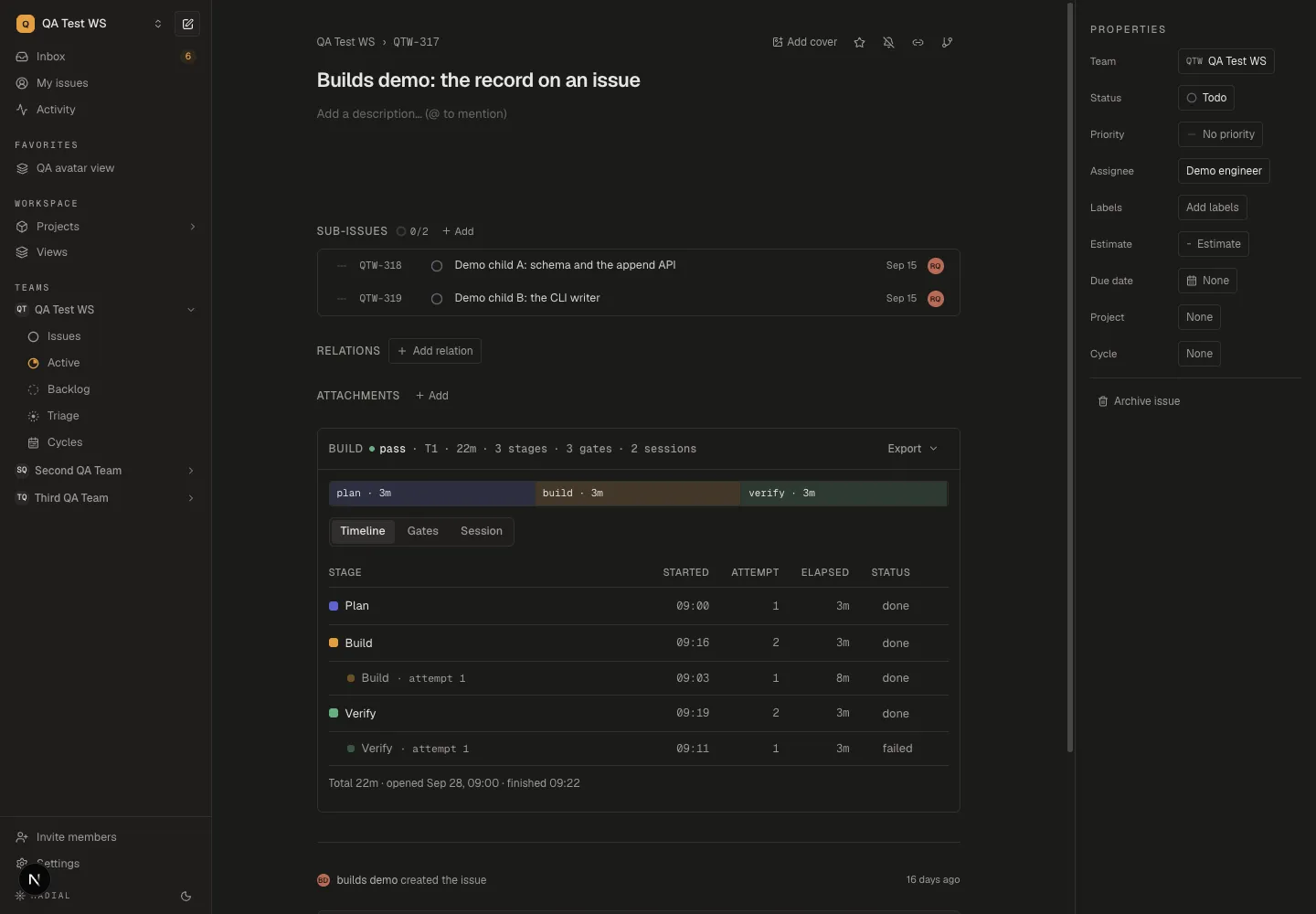
The walkthrough uses this smaller definition:
{
  "version": 1,
  "stages": [
    { "id": "plan", "position": 0 },
    { "id": "build", "position": 1 },
    { "id": "verify", "position": 2 }
  ],
  "gates": [
    { "id": "unit", "tiers": ["T0", "T1", "T2", "T3"] }
  ]
}
Connect gate names to commands
The configuration has no command field. Supply a command when recording a gate:
radial build gate --gate unit --exec -- node --test src/release-note.test.mjsThis example uses the test file from the walkthrough and requires an open
build or draft. The CLI runs the command after --, stores its output in the
journal, and records the exit code, duration, and an extracted summary. Exit
zero produces pass; a nonzero exit produces failed and a nonzero CLI exit.
Inspect the output to confirm that the intended checks ran.
To record an exclusion your runner has already determined:
radial build gate na --gate e2e --tier T1That command requires a configuration declaring e2e, such as the default
above. It records an n/a row naming T1; it does not verify that T1 excludes
the gate. Results supplied with --result are agent-reported evidence. See
Build records for provenance.
With the agent skills, rd-verify resolves commands
from a wrapper, repository instructions, or package scripts. Keep those command
names aligned with the gate ids recorded by rd-build.
Complete a stage
The built-in ids have these payload requirements when completing a stage with
status done:
| Stage | Required payload field |
|---|---|
plan | baseline |
prototype | attachment |
materialize | issues |
build | None |
verify | outcome, one of pass, partial, or failed |
radial build stage done verify --payload '{"outcome":"pass"}'These required fields follow the built-in id even if you change its position.
Custom ids have no built-in required payload fields. --payload-file reads
JSON from a file when the payload is too large for an inline argument.
A skipped stage requires a reason:
radial build stage done prototype --status skipped --reason "No interface change"The CLI requires that reason regardless of the stage's optional value.
Neither a completion payload nor radial build finish proves that all required
checks passed.
Snapshots and changes during a build
The CLI hashes the resolved version, stages, and gates. Object key order, gate
order, and tier order do not affect the hash. Stage positions do affect it.
source and the hash itself are excluded.
The server snapshots the pipeline when it first creates the issue's build. Resuming or reopening that build preserves the snapshot, which the server uses to validate gate ids. A draft binds using the configuration in effect at bind time, so keep its file stable while recording it.
The CLI reads the current local file for subsequent commands. If you change gate ids mid-build, local validation and the server snapshot can disagree. Keep the definition unchanged for an existing build; reopening the same issue's build does not adopt a new snapshot. Apply a revised definition to a new build on a different issue.
Troubleshooting
| Symptom | Check |
|---|---|
show reports shipped after editing the file | Run from the directory containing .radial/pipeline.json; the CLI does not search parent directories. |
Could not read ...pipeline.json | Check JSON syntax and the field shapes above. |
unknown gate in the CLI | Compare the id with pipeline show; a supplied list replaces all defaults. |
| A gate is accepted locally but rejected during sync | Compare the local definition with the pipeline stored on the existing build. |
| A new stage never runs | Add an explicit stage invocation to your agent's procedure or script. |
| A build finishes with missing or failed gates | Finishing records the end of execution. Your automation must evaluate readiness separately. |
For decisions about evidence freshness and approval enforcement, use the workflow design guide.