Development workflows
Implement a workflow with Radial
Configure a pipeline, run a check, and preserve a failed attempt and its fix in one build record.
This walkthrough records a small change: reject a blank release note. You will define the stages and gate in JSON, run a failing test through the CLI, fix the implementation, and inspect both attempts.
- Commit AAttempt 1Blank input is accepted. Unit check fails.
- Commit BFixReject blank input and commit the change.
- Commit BAttempt 2Run the check again. Preserve both results.
The example uses a local draft and sends nothing to Radial. You can complete the local steps without signing in. The final section explains how to start a real run on an issue before recording its checks.
Prepare a scratch repository
You need Git, Node.js 20 or later, and the Radial CLI. Use an empty directory so the example does not replace an active build or an existing pipeline. Check that your installed CLI exposes the build commands:
radial build help
mkdir radial-workflow-example
cd radial-workflow-example
git init
radial build pipeline init
mkdir -p src
Your repository will contain:
.radial/
  pipeline.json
  build.json          # local pointer, created when the draft starts
src/
  release-note.mjs
  release-note.test.mjs
.gitignore
Create .gitignore with .radial/build.json on its own line. Commit the
pipeline definition with your source files. The build pointer is local to this
checkout; the journal lives outside the repository.
Define the process and its configuration
The acceptance criteria are that whitespace is trimmed from a release note and an empty or whitespace-only note throws an error. The unit gate checks both. For this exercise, you act as the implementer and inspect the evidence before finishing the run.
Replace .radial/pipeline.json with:
{
  "version": 1,
  "stages": [
    { "id": "plan", "position": 0 },
    { "id": "build", "position": 1 },
    { "id": "verify", "position": 2 }
  ],
  "gates": [
    { "id": "unit", "tiers": ["T0", "T1", "T2", "T3"] }
  ]
}radial build pipeline showThe output should identify the repo as the configuration source and list
plan, build, verify, and the unit gate. The JSON declares the vocabulary
for this run. The commands below drive it; stage ordering and gate completeness
are not enforced by the configuration.
Open the draft and record the plan
radial build start --draft release-note --workspace workflow-example
radial build stage start plan
radial build stage done plan --payload '{"baseline":"Release notes accept whitespace-only input. Trim notes and reject empty input; verify both with node:test."}'
radial build stage start build
The first command prints Draft opened and nothing sent. Later commands use
the pointer in .radial/build.json. The baseline field is required when
completing the built-in plan stage.
Set a shell variable for the journal directory so you can read its logs:
release_journal="${RADIAL_BUILDS_DIR:-${RADIAL_CONFIG_DIR:-$HOME/.config/radial}/builds}/workflow-example/drafts/release-note"This matches the directory printed when the draft opens, including a custom CLI configuration or build directory if you use one.
Implement the change and expose the failure
Create src/release-note.mjs with this incomplete implementation:
export function releaseNote(input) {
  return input.trim();
}
Create src/release-note.test.mjs:
import assert from 'node:assert/strict';
import test from 'node:test';
import { releaseNote } from './release-note.mjs';

test('trims a release note', () => {
  assert.equal(releaseNote('  Fixed search  '), 'Fixed search');
});

test('rejects empty and whitespace-only notes', () => {
  for (const input of ['', '   ']) {
    assert.throws(() => releaseNote(input), /Release note is required/);
  }
});
Commit the candidate so the recorded stages can name a revision:
git add .gitignore .radial/pipeline.json src/release-note.mjs src/release-note.test.mjs
git commit -m "test: specify release note validation"
radial build stage done build
radial build stage start verify
radial build gate --gate unit --exec -- node --test src/release-note.test.mjs
The gate exits nonzero and records failed. One test passes; the empty-note
test fails. Record the failed verification attempt and read the command output.
Run these blocks separately, so a shell that
stops on failure does not skip this step:
radial build stage done verify --status red --payload '{"outcome":"failed"}'
cat "$release_journal/artifacts/unit-1.log"
Command logs live in the journal's artifacts directory. --exec captures output there;
the terminal prints the gate result and an extracted summary rather than the
full test output. Open the log to inspect the assertion failure.
Fix the change and keep both attempts
radial build stage start buildReplace src/release-note.mjs with:
export function releaseNote(input) {
  const note = input.trim();
  if (!note) throw new Error('Release note is required');
  return note;
}git add src/release-note.mjs
git commit -m "fix: reject blank release notes"
radial build stage done build
radial build stage start verify
radial build gate --gate unit --exec -- node --test src/release-note.test.mjsThis gate should exit zero and record pass as attempt 2. Check the log for
two passing tests and zero failures. The CLI assigns the result from the exit
code; confirming that the intended tests ran remains your responsibility.
cat "$release_journal/artifacts/unit-2.log"
radial build stage done verify --payload '{"outcome":"pass"}'
radial build drafts
radial build finish
The record retains both gate attempts and both verification attempts. Finishing the draft leaves it local. It does not merge code, close an issue, or grant release approval.
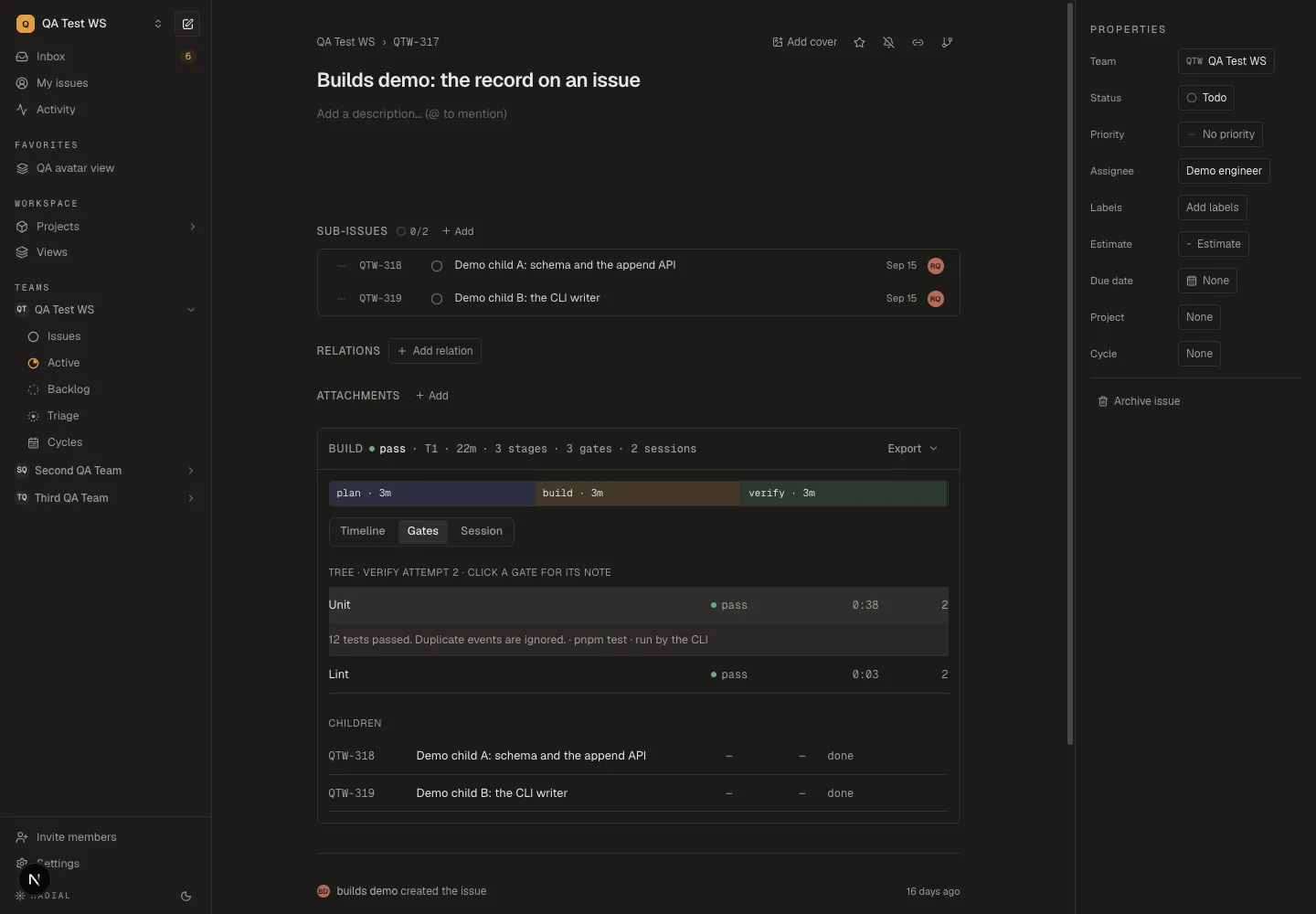
The latest result appears first. The failed attempt remains underneath, and opening the gate's note reveals the evidence and how it was recorded.
Read or resume the work later
radial build drafts
cat "$release_journal/journal.jsonl"
To continue this same draft, open it again with
radial build start --draft release-note --workspace workflow-example, then
start the stage you are working on. Re-entering a stage adds an attempt. Read
the existing record before repeating a command; the CLI does not decide which
checks a new commit makes stale.
In a new terminal, set release_journal again using the command above.
radial build show --local reads issue-bound builds; unbound drafts are
inspected through their journal and logs.
Attach a real run to an issue
For team work, authenticate with radial auth and select the intended workspace
with radial workspace use. Start a draft in that workspace, or open a build
on an existing issue with radial build start and its issue key. The explicit
workflow-example workspace above is only for the local exercise.
Once a real draft has an issue, radial build bind followed by that issue's key
replays its stage history. Bind before recording verification gates: the current
draft replay does not preserve draft gate rows on the issue. Start a real build
on its issue before running the checks you want your team to inspect.
On the issue, inspect Build → Timeline for stage attempts and Gates for results and evidence. Capturing the chat requires a separate build hook.
Binding publishes the draft's stage history to your workspace. Check
the destination before running it. Drafts are listed by workspace; to inspect
this exercise after switching workspaces, use
radial build drafts --workspace workflow-example.
Adapt the example to your team
Replace the test command with your repo's verification command. Keep gate ids
aligned with Pipeline configuration. When using the
agent skills, put exact commands in an
rd-verify wrapper; rd-build
owns recording its returned results.
Use CI and code-host rules for required checks and reviewer approval. Keep your release procedure responsible for permission to deploy and checking the running revision. Radial's build record gives reviewers the history to inspect; the current pipeline does not enforce those transitions or approvals.