Development workflows
Builds
Every agent build leaves a structured, searchable record on its issue, with the stages, each child's window, the gates with their evidence, and the chat.
Ask an agent how a piece of work went and you get a paragraph. Ask the issue and, until now, you got the same paragraph, written by the agent, in a comment.
A build is that answer as data. One build per issue: the stages it went through, the window it spent on each child, every verification gate with the evidence behind it, and a searchable timeline of what the agent actually did, stitched across every session that touched the issue and surviving the workspace that produced it.
You read it on the issue. There is no separate page.
What a build is made of
Stages. An ordered list, one per workflow skill: plan · prototype · materialize · build · verify. Re-entering a stage appends an attempt rather
than overwriting it, so a verify battery that went red and then green shows both.
Child windows. The work happens per child, so the build stage is subdivided:
radial build child start RAD-383 opens a window, and every gate, event and
stamp recorded until child done belongs to that child. The window closes with a
determination (done, partial, not done or n/a) and a comment.
Gates. The verification rows, each with a result (pass · partial · failed · n/a), an elapsed, an attempt and a provenance:
| Provenance | What it means | How a row earns it |
|---|---|---|
| run by the CLI | The CLI executed the command and read its exit code, duration and summary line | radial build gate --gate unit --exec -- pnpm test |
| imported | Read from a standing file | radial build gate --import gates-abc.json |
| reported by the agent | The agent's own word | radial build gate --gate browse --result pass |
The server decides which one a row gets, from the shape of what arrives. A row that claims it was observed but carries no execution envelope is stored as reported by the agent. A digest proves nothing; only execution earns it.
A gate the tier did not select is recorded as n/a with the tier named, never
left out. A missing row and a skipped row look identical, and only one of them
is honest.
Events. The normalized chat: your messages, the agent's, its tool calls, the agents it dispatched, the errors it hit. Every event carries the id of the session that produced it, so a build worked on across two days by two clients reads as one timeline.
Recording one
The rd-* skills do this for you. rd-plan opens the build, each workflow skill
brackets its own stage, rd-build opens and closes a window per child and
records a gate per row rd-verify reports, and the last step is an explicit
radial build finish. If you never install the hook below, you still get
everything except the chat.
By hand, the whole vocabulary is start, stage, child, gate, report
and finish:
radial build start RAD-382                    # opens, or resumes
radial build stage start build
radial build child start RAD-383
radial build gate --gate unit --exec -- pnpm test
radial build gate --gate browse --result pass --evidence "4/4 observed on screen"
radial build child done RAD-383 --determination done
radial build report --file report.json        # prints the tables it derives
radial build finish
Before the issue exists
A plan usually happens before its issue does. radial build start --draft <slug> opens a draft that lives only in your journal. You can record stages
and checks locally, with timestamps, and nothing is sent. When the parent is created,
radial build bind RAD-382 turns the draft into that issue's build, replaying
its stages at the times they really happened. The plan stage reads 14:21, not
"created at bind time".
Bind before recording checks you want to see on the issue: the current replay
preserves draft stages but does not publish draft gate rows. Use the local
journal to inspect an unbound draft; build show --local expects an issue-bound
build. The walkthrough
shows the journal and command logs.
radial build drafts lists unbound drafts; radial build drafts rm <slug>
deletes one. A plan you abandon leaves nothing in Radial.
Capturing the chat
radial build hook install --client claude     # a Stop hook
radial build hook install --client codex      # a notify entry
The hook runs at the end of every agent turn, parses what is new in the
transcript, redacts it, and appends it. Hooks capture and never finalize:
radial build finish stays an explicit step in the skill.
What leaves your machine
| Always | Stages, child windows, gate rows and the report |
|---|---|
| On capture | The event timeline, redacted before it is journaled and again before it is stored |
Only with --with-raw | The raw session file, gzipped and redacted, downloadable by its own session's user or a workspace admin |
Redaction covers API keys, OAuth tokens, bearer headers, JWTs, connection
strings, private-key blocks and NAME=value secrets. The CLI redacts before it
writes and the server redacts again before it stores, against a class list that
is byte-identical in both and pinned by a test in each.
The journal itself lives outside your repo, at
~/.config/radial/builds/<workspace>/<ISSUE>/, so archiving the workspace does
not take the build with it. Everything works with no connectivity at all;
radial build sync catches up later.
Configuring the pipeline
radial build pipeline init # writes .radial/pipeline.jsonKeep .radial/pipeline.json in version control. It declares stage ids and
positions, gate ids, and tier membership. Supplied lists replace the defaults.
The pipeline reference covers every field and how
configuration snapshots behave.
Configuration does not schedule the workflow or require gates to pass before
finish. Your agent or runner drives the commands. For a worked example,
follow Implement a workflow with Radial; for stage
contracts and approval rules, start with workflow design.
Events and correlation
Every producer names the events it pushes and the keys that tie them to the
build and to the session that produced them. The keys are the build (the issue,
from .radial/build.json), the session id (read from CLAUDE_CODE_SESSION_ID,
CODEX_THREAD_ID, the hook payload, or --session), the open stage attempt,
and the open child window.
| Producer | Verb | Events it pushes | Correlation |
|---|---|---|---|
rd-plan, before the parent exists | build start --draft <slug> | draft.opened (local only, nothing sent) | Journal keyed on the slug |
rd-issues, once it exists | build bind <PARENT> | build.opened, with the draft's stages at their journaled times | Binds the issue |
| any skill, on an existing parent | build start <PARENT> | build.resumed or build.reopened | Appends the session to sessions[] |
rd-plan | `stage start | done plan` | stage.started, stage.done |
rd-prototype | `stage start | done prototype` | stage.* with the attachment and critic score |
rd-issues | `stage start | done materialize` | stage.* with the issues and edges |
rd-build | stage, child, gate, report, finish | child.started, child.done, gate.recorded, report.put, build.finished | Child windows add the issue; gate rows inherit the open window |
rd-verify | none, it returns rows to rd-build | n/a | n/a |
| Claude Code Stop hook | build hook stop | event.appended[], session.seen | Session id and transcript path from the hook payload |
| Codex notify hook | build hook codex-notify | Same | Thread id from the notify payload |
| any agent, by hand | build capture --transcript <path> | Same | --session when the environment names none |
Reading it back
On the issue: a Build section with three tabs. Timeline is the stages and the time spent in them, with each child's window indented under Build. Gates is the verification rows, earlier attempts stacked under the latest, each with a note naming its evidence and who produced it. Session is the chat, every session stitched, tool calls folded, searchable.
A parent shows the whole tree. A child shows the same build scoped to its own window, and links back to the parent for the rest. An issue with no build has no Build section.
Read session analytics
Open an issue, scroll to Build, and choose Timeline, Gates, or Session. Use Timeline to see where time went, Gates to inspect the checks, and Session to follow the agents' work. These app screenshots use a demo issue with sample build and session data. No customer session is shown.
Time and repeated work
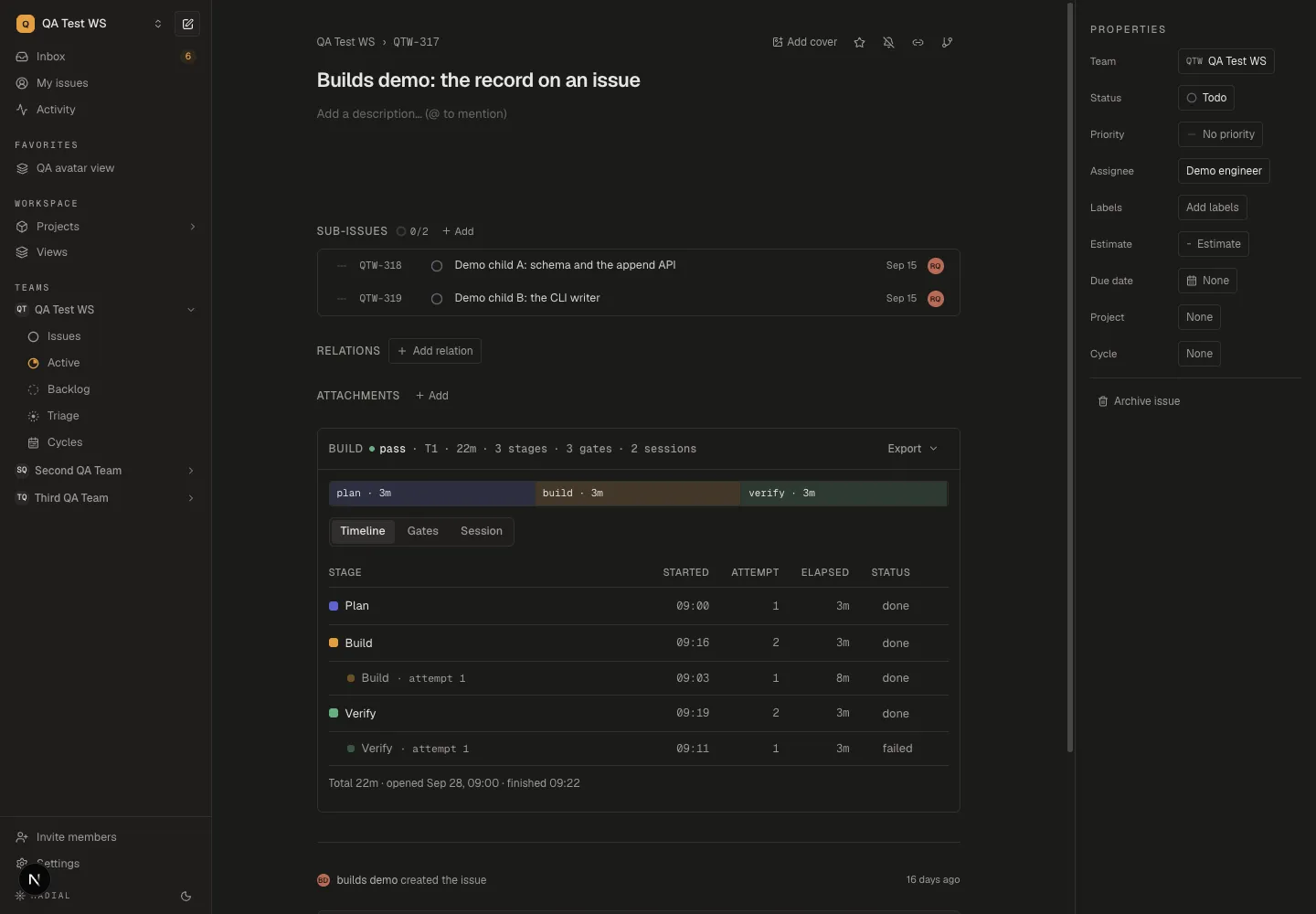
The Attempt column separates a first pass from repeated work. Elapsed is the stage attempt's recorded wall time. The total spans the build's opening and finish, which can include pauses. The stage bar summarizes the latest attempts; it does not add every historical attempt into a cumulative time chart.
Sessions, events, and tokens
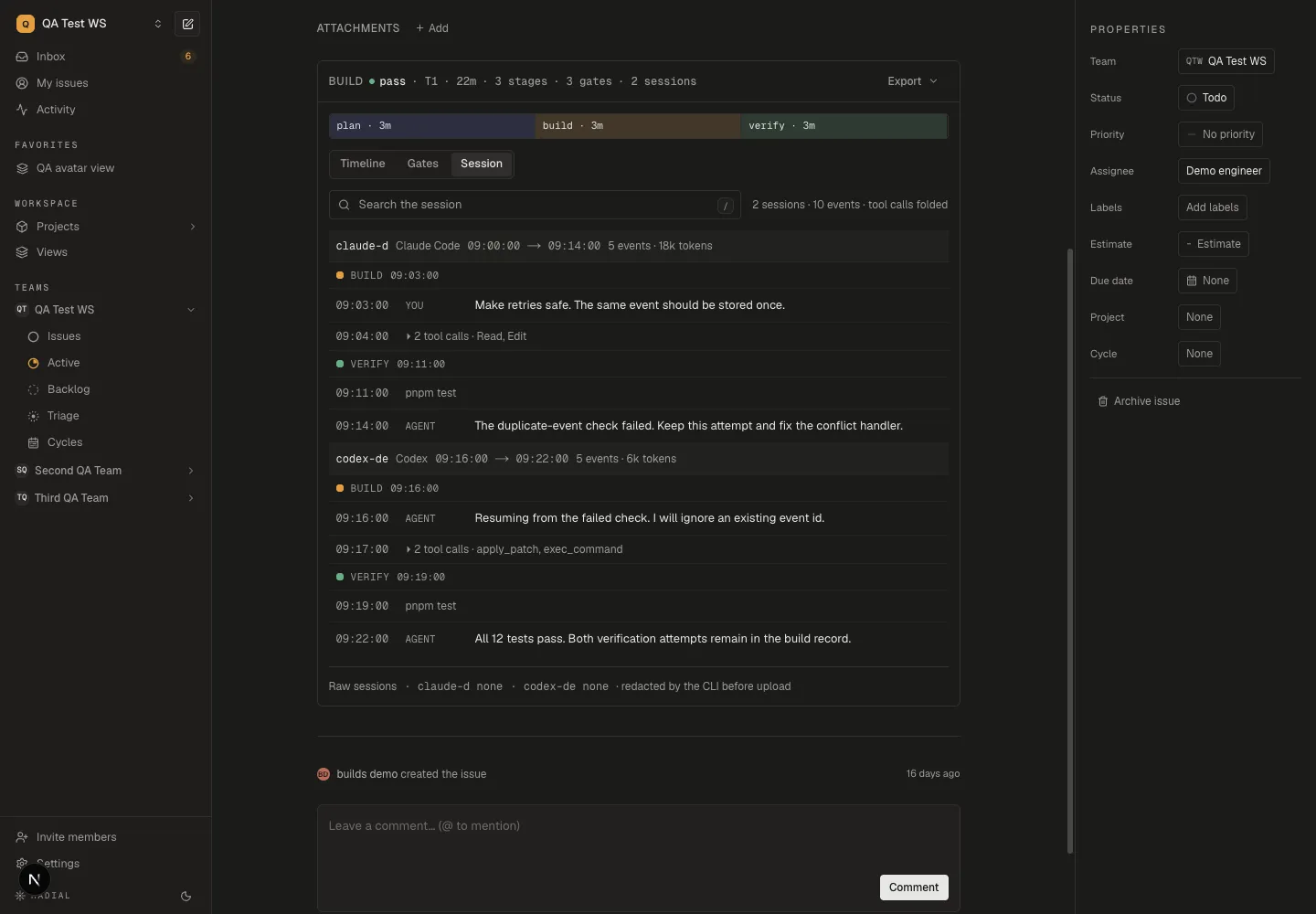
Read each session header from left to right: session id, client and available version or model information, first and last seen times, event count, and token count when available. The example shows an interrupted check followed by another agent continuing the work.
The counts depend on what the capture client reports. An absent token figure does not prove zero usage, and tokens are not a dollar bill. First and last seen times delimit the captured session; they do not measure uninterrupted agent compute time. Compare the conversation and check evidence before attributing a long interval to engineering work.
Search the session for a failure, file name, or decision and press Enter. Tool calls are folded in the default view; search results show matching events individually. The normalized timeline can be present even when no raw session file was uploaded.
Checks and their evidence
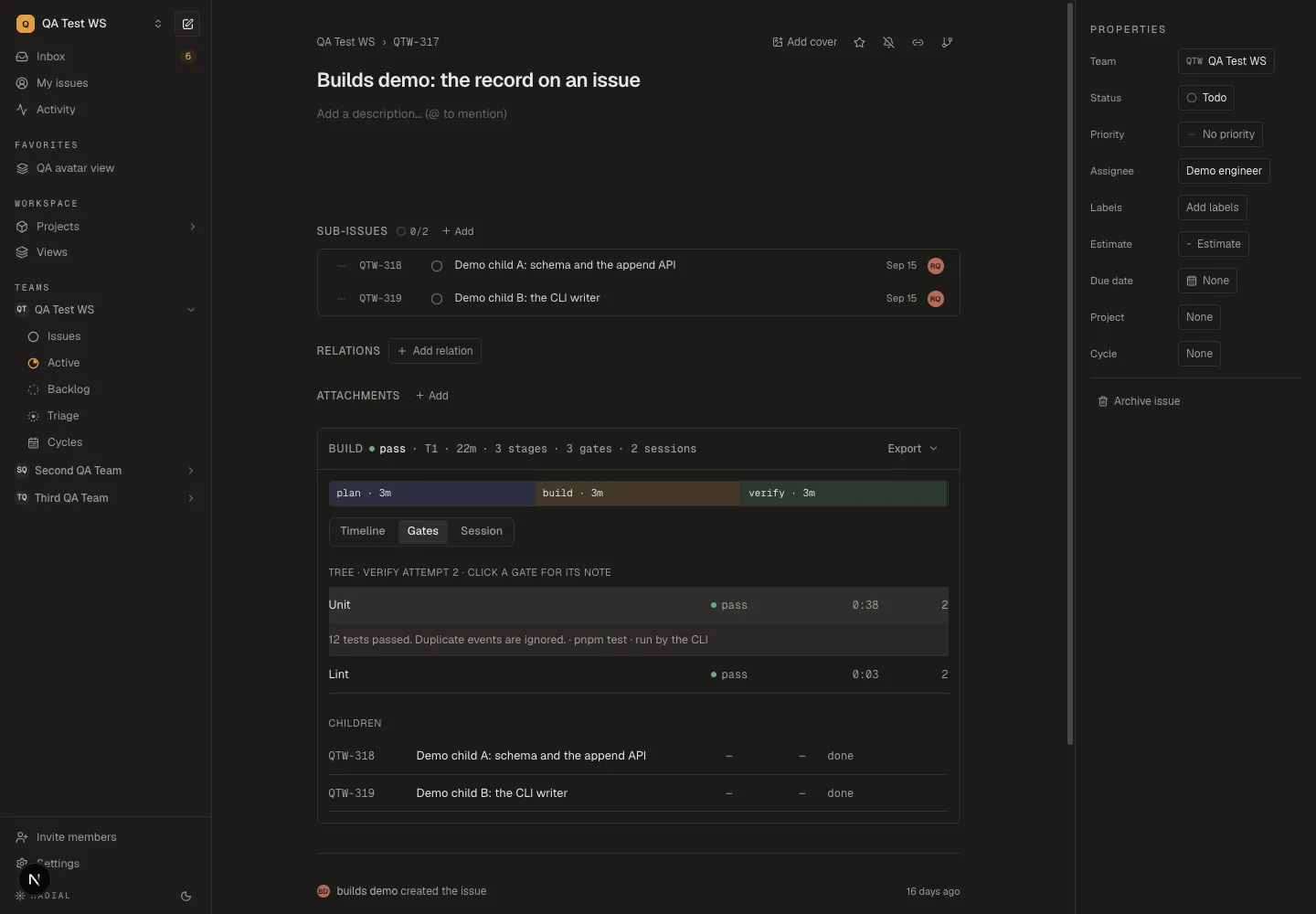
Check the attempt number and evidence together. A later pass preserves the earlier failure in the build record. On a parent issue, the Gates table shows tree gates from the latest verify stage attempt. Earlier gate attempts stack under the latest result only within that displayed scope. Export the report or read the build through the CLI to inspect gates from earlier verify stages.
Provenance describes how the result was recorded; it is not cryptographic proof that a trusted runner executed it. The server checks the shape and consistency of the submitted execution details.
Read from the terminal or an agent
From the terminal:
radial build show RAD-382                 # the rollup
radial build show RAD-382 --local         # from the journal, no network
radial build search RAD-382 "42501"       # full-text over the timeline
radial build export RAD-382 --report -o report.json
radial build export RAD-382 --events -o events.jsonl
radial build export RAD-382 --raw <session> -o session.jsonl.gz
From an agent, over MCP: get_build_rollup, get_build and
search_build_events, on both the hosted server and radial mcp. They are
read-only, because recording a build is the CLI's job: only the CLI can run a
command and vouch for what it saw.