Development workflows
Design your development workflow
Define stages, evidence, and approval rules that your team can carry across agents and sessions.
An agent finishes a change. Before someone can merge it, the team still needs to know which requirements it met, what was checked, and whether the reviewer approved the code that is now on the branch.
Make those questions part of your development process. Give each stage an input, an output, a condition for advancing, and someone responsible for the decision. Then decide which conditions software can check and which need engineering judgment.
This guide is for engineers building a workflow around their own coding agents, repository instructions, and CI. You can apply the model with your existing tools. The implementation walkthrough shows how Radial's pipeline configuration and build records fit into it.
Define a stage contract
Take one recent change through your process. Write down what someone needed before starting each stage and what the next person needed when it ended. Include the path back when a check or review fails.
Here is an example lifecycle. Adapt it to your team; a documentation correction and a database migration may need different checks.
- OwnerSpecifyScope approved
- Engineer + agentImplementCandidate commit
- RunnerVerifyCurrent evidence
- ReviewerReviewCandidate approved
- Release ownerReleaseRunning revision checked
| Stage | Input | Output | Condition for advancing |
|---|---|---|---|
| Specify | Request and constraints | Acceptance criteria and verification plan | The designated owner approves the scope |
| Implement | Approved scope and current base | Candidate commit and implementation notes | The implementation addresses the acceptance criteria |
| Verify | Candidate commit and applicable checks | Results and supporting artifacts | Required checks pass for this candidate |
| Review | Diff, criteria, and current evidence | Findings and approval | Blocking findings are resolved and the reviewer approves the candidate |
| Release | Approved candidate and release permission | Deployment identity and health results | The authorized release runs the expected revision and passes health checks |
For each condition, name who evaluates it. A test runner can check a return value. A reviewer decides whether the behavior meets the intent of the request. A release owner authorizes a production change. Record those decisions where the next participant can read them.
Separate instructions from checks
Keep design context, tradeoffs, and working procedures in readable instructions. Put conditions with precise answers into code: whether a dependency is complete, whether the required tests ran, or whether an approval names the current candidate.
JSON gives that code a shared input. Define the meaning of each field before
adding it. A required property only affects behavior if something reads it
and refuses the operation when the requirement is unmet.
| Component | Responsibility |
|---|---|
| Process definition | Names stages, checks, and the rules your evaluator understands |
| Evaluator | Reads the definition and current evidence; returns satisfied and unmet conditions |
| Agent or runner | Performs the work and submits results through defined interfaces |
| Execution record | Preserves attempts, results, artifacts, actors, and decisions |
The agent can choose an implementation and request the next step. The component authorizing that step evaluates its prerequisites. If merging requires passing CI, enforce that at the merge boundary. An instruction in one agent's context cannot enforce the same rule for every other client.
Specify what this process layer evaluates, which operations it controls, and what evidence it retains.
Bind evidence to the work it checks
A test result needs enough context to determine whether it still applies. Record the candidate commit, check command or definition, process version, result, and relevant environment. Deployment checks also need the identity of the running revision.
Suppose unit tests pass on commit A. The agent then changes code and creates commit B. Keep A's result in the history, but require evidence for B before advancing. Apply the same rule to review: an approval should identify the candidate the person reviewed.
- Commit AAttempt 1Blank input is accepted. Unit check fails.
- Commit BFixReject blank input and commit the change.
- Commit BAttempt 2Run the check again. Preserve both results.
Decide which sources count for each condition. An agent's report of a manual check, a local command's execution record, and an authenticated CI result give you different evidence. A process can accept all of them while requiring a particular source for a particular decision.
Make failure and interruption ordinary paths
When verification fails, retain the failed attempt and return the change to implementation. A later pass should add evidence without erasing the failure. When an agent stops, the next session should be able to read the current state and identify unfinished work.
Specify these behaviors before adding more stages:
- A retry creates a new attempt. Re-sending the same event should not duplicate it.
- A changed candidate makes affected results and approvals stale.
- A blocked dependency names the work or decision that will unblock it.
- Concurrent workers claim work through an operation that prevents conflicting ownership.
- A waiver names its author, reason, scope, and expiry, while preserving the failed or missing check.
Keep execution status separate from acceptance. A finished run may have failed. Moving an issue to another status should not create test evidence or imply that someone approved the change.
Version the process
Review process changes in Git alongside the code they govern. Keep the definition used by an execution with its record, so a later policy edit does not change the meaning of an earlier result.
Define how active work adopts a new process version. That might mean finishing under the original definition or explicitly starting a new execution. Avoid silently combining checks from one version with approval rules from another.
If your team varies checks by risk, make the selection rule inspectable. Record which checks were excluded and why. A missing result gives the reviewer no way to distinguish a deliberate exclusion from work that never ran.
Apply the model in Radial
Radial provides a JSON pipeline definition, CLI commands for recording and executing checks, and a build record attached to the issue. Your agents and automation drive those interfaces.
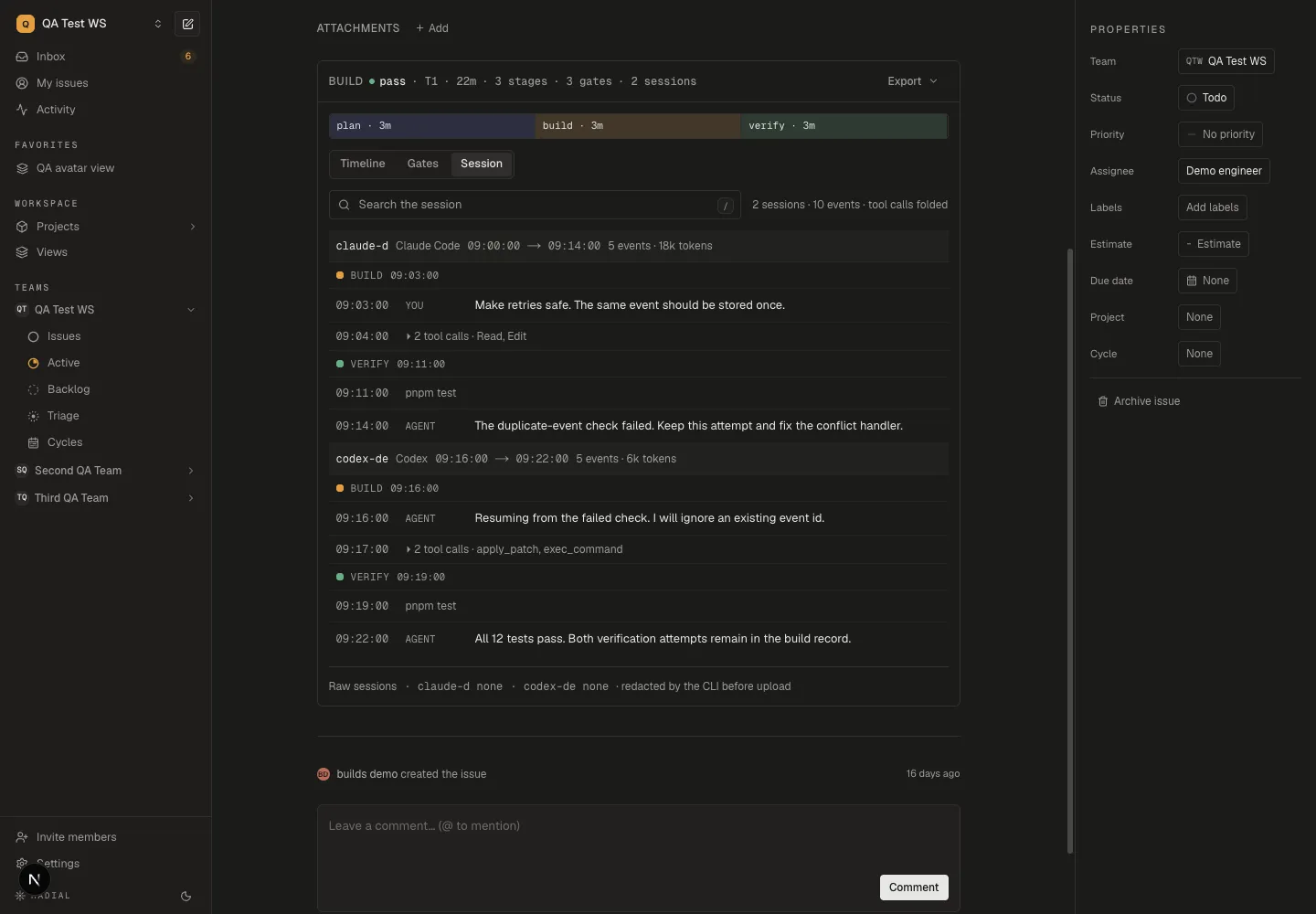
Each session header identifies its client, time range, and recorded usage. Stage markers show where the work happened; tool calls fold together so you can follow the conversation. Read the session analytics guide to interpret the figures and their limits.
| Responsibility | What Radial provides today | What your team supplies |
|---|---|---|
| Declare the process | Stage ids, positions, optionality, gate ids, and tier membership in .radial/pipeline.json | Stage contracts, command selection, dependency and approval policies |
| Execute checks | radial build gate --exec -- <command> runs a command and records its result | The command and a check that its output proves the intended work ran |
| Validate records | Gate-id checks, required payload fields for built-in stages, and evidence provenance classification | Readiness evaluation and enforcement at merge or release boundaries |
| Preserve history | Build attempts, gate results, child windows, and captured sessions | Decisions about stale evidence, trusted sources, and approval authority |
The pipeline does not automatically schedule stages, select checks by risk, invalidate stale evidence, or enforce approval rules. Finishing a build closes its execution record; required gates can still be missing or failed.
Start with Implement a workflow with Radial to configure a pipeline, record a failed check, and keep both attempts when it passes.