Previews
Your agent builds the prototype. Radial gives it a URL.
To share an HTML prototype that Claude Code or Codex built, attach it to the issue it belongs to. One command uploads the file and prints a Preview URL that everyone in the workspace can open, rendered in a sandbox, with comments on the file itself. No deploy, no hosting, no screenshot decaying in a Slack thread.
$ radial attach RAD-42 billing-v2.html
✓ Attached billing-v2.html to RAD-42
 Preview: https://app.radial.build/p/acme/RAD-42/f3a9c1
The prototype your agent already built during planning, reviewed where the work is tracked. That URL is the whole product: click it, and you are inside a Radial frame with every prototype on the issue in one menu.
One command to review
radial attach RAD-42 prototype.html prints a Preview URL. Same capability over MCP and REST, so your agent can attach mid-plan without a human touching a browser.
Reviewed where the work is tracked
The URL is workspace-only and wrapped in Radial. Every HTML file on the issue sits in the Preview menu, comments are scoped per file. Post the decision as an issue comment, where your agent reads it next.
Sandboxed on purpose
Every prototype renders as untrusted code: an opaque-origin, sandboxed frame that cannot read your Radial cookies or storage, and whose fetch, XHR and form submits are blocked. Images, scripts, styles and frame navigation still load, and a prototype that fetches data will not work here. We assume the worst about the file.
How we render untrusted HTML
We treat every prototype as hostile code.
A prototype is bytes someone (or some agent) uploaded. So Radial serves it under a content-security sandbox. With no allow-same-origin, the file runs on an opaque origin: it cannot read your Radial cookies or storage or touch the Radial page around it, even if you open the raw file directly. connect-src 'none' blocks fetch, XHR, WebSocket, EventSource and sendBeacon, and form-action 'none' blocks every form submit, so neither a script nor a fake login form in the file can send data out through fetch, XHR or a form. Inside the Radial frame it cannot navigate your tab away from Radial. Only the workspace can see it. HTML and raster images render; other file types download.
The policy still lets the file load images, scripts, styles and fonts from other origins (a mockup needs its CDN assets), and the file can navigate its own frame; a URL in any of those can carry data. So a Preview is a sandbox for untrusted code, not a guarantee that the file sends nothing anywhere. Because fetch and XHR are blocked to every origin, Radial included, a prototype that fetches data will not work in a Preview: inline its data instead.
The exact header on every attachment response:
Content-Security-Policy: sandbox allow-scripts allow-forms allow-modals; connect-src 'none'; form-action 'none'; frame-ancestors 'self'
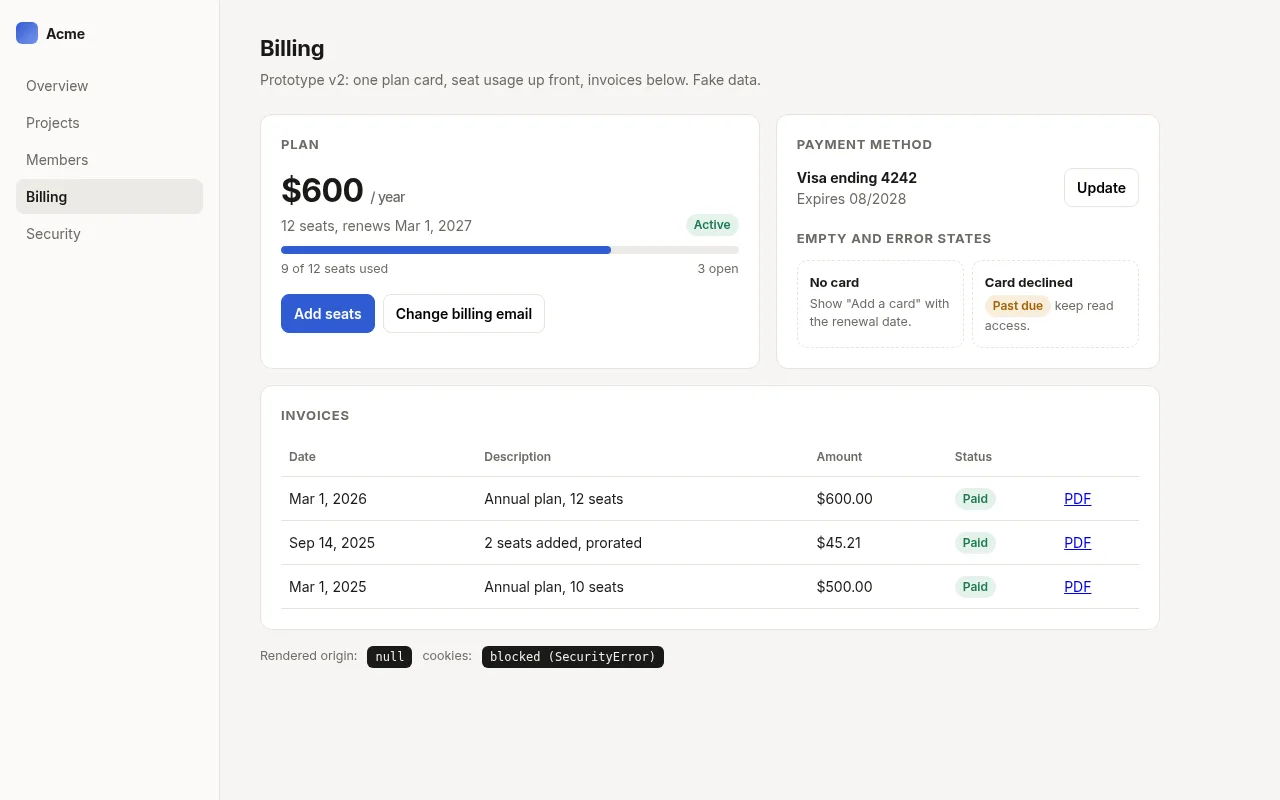
null, cookies blocked.Compared
Where a prototype ends up today.
| How | Reviewer does | Isolation | Feedback lands |
|---|---|---|---|
| Send the file in chat | Download and double-click | Without Radial’s sandbox: opens as a local file | A chat thread |
| Deploy to a static host | Click a URL | Its own origin, public unless you add auth | Somewhere else |
| Attach to a Jira issue | Download it (no HTML preview documented) | Without Radial’s sandbox once opened locally | Issue comments |
| Attach to a Linear issue | Download the upload (no HTML preview documented), or follow a link to its host | Without Radial’s sandbox once opened locally; else depends on the host | Issue comments |
| Attach to a Radial issue | Click a Preview URL | CSP sandbox, opaque origin | Comments on the file; copy the decision to an issue comment |
You’re rendering arbitrary HTML?
Yes, and that is the feature. Prototypes are untrusted code by default here: they render in a sandbox on an opaque origin, with fetch, XHR and form submits blocked. The other common path is to download the file and open it locally, which runs it without Radial’s sandbox.
Why not just deploy it to Vercel or Netlify?
You can, for the thing you’re shipping. A prototype is a question, not a release. Previews skip the repo, the pipeline, and the hosting account; access is workspace membership, not a URL you hope stays obscure; and the feedback lands on the issue instead of a deploy nobody can find in three weeks.
FAQ
Sharing agent prototypes, answered.
How do I share an HTML prototype my coding agent built?
Attach it to the issue: radial attach RAD-42 prototype.html uploads the file and prints a Preview URL. Everyone in the workspace can open it, rendered in a sandbox, with comments on the file. Your agent can do the same through the attach_file tool on the hosted MCP server (the local radial mcp server does not have it yet) or the REST API.
Who can open a Preview URL?
Signed-in members of your Radial workspace. The URL is not public: anyone else who gets the link is sent to sign in, and only workspace members see the file. There is no hosting account to manage. A reviewer outside the workspace needs a seat.
Is it safe to render HTML an agent generated?
Radial treats every prototype as untrusted code. Every response carries Content-Security-Policy: sandbox allow-scripts allow-forms allow-modals; connect-src 'none'; form-action 'none'; frame-ancestors 'self'. With no allow-same-origin, the file runs on an opaque origin: it cannot read your Radial cookies or storage or touch the Radial page around it, even if you open the raw file directly. connect-src 'none' blocks fetch, XHR, WebSocket, EventSource and sendBeacon, and form-action 'none' blocks every form submit, so neither a script nor a fake login form in the file can send data out through fetch, XHR or a form. Inside the Radial frame it cannot navigate your tab away from Radial. The policy still lets the file load images, scripts, styles and fonts from other origins (a mockup needs its CDN assets), and the file can navigate its own frame; a URL in any of those can carry data. So a Preview is a sandbox for untrusted code, not a guarantee that the file sends nothing anywhere. Because fetch and XHR are blocked to every origin, Radial included, a prototype that fetches data will not work in a Preview: inline its data instead. HTML and raster images render; SVG and other file types download.
How big can a prototype be?
One file per attach, up to 3 MB through the CLI, the MCP server and the REST API, and up to 25 MB through the web app, with up to 50 attachments per issue. Inline the CSS, scripts and images of a multi-file prototype into one HTML file.
Do Jira or Linear preview HTML prototypes?
Neither documents it, as verified on Nov 2, 2026. Jira documents no HTML preview, and its MCP upload tool is reached through discover. Linear supports file uploads on issues but documents no rendered HTML preview. Reviewers download the file or open it wherever it is hosted.
Can reviewers comment on the prototype?
Yes. Comments are scoped to the file and stay with it, and every HTML file on the issue sits in the Preview menu. File comments do not reach the issue thread your agent reads, so post the decision as an issue comment before the agent builds.
Does a Preview cost extra?
No. Previews are part of the one plan: $50 per user per year, flat. Agents are not billed as seats and no credits are charged.
The full comparison of ways to share a prototype is in how to share an HTML prototype your coding agent built.
Attach a prototype. Get a Preview.