How to save Claude Code and Codex session logs before they disappear
Claude Code deletes local transcripts after 30 days by default, and Codex rollouts live in one folder on one laptop. How to keep each session on the issue it worked on with Radial, how to keep them locally without a tracker, and what a scripted no-tracker baseline re-reads to resume.
To keep a Claude Code or Codex session, attach it to the issue it worked on, so it outlives the laptop and the whole team can read it. With Radial that is four commands: npm i -g radial.build, radial auth, radial build hook install --client claude (or --client codex), and radial build start <ISSUE> in the checkout where the agent works. The last one is required: the hook records nothing until a build is open on an issue. From then on, each turn is redacted on your machine and appended to the issue's build record. Without a tracker, raise Claude Code's cleanupPeriodDays (default 30) in ~/.claude/settings.json and back up ~/.claude/projects/ and ~/.codex/sessions/. The file route works. In our scripted baseline harness (raw runs), the resume step after a session ends re-fed 7,217 bytes with 50 tasks in the repo. Reading the task and decision files whole is a separate measure that grows with the project: 7,325 bytes at 50 decisions, 144,451 bytes at 1,000. We have not run the same resume through Radial, so this post claims no saving: Radial's own local MCP tool schemas cost 12,923 bytes per session, more than the file resume at 50 tasks.
This post does the Radial version first, then the files-only version, then the numbers.
#How do I save and keep my Claude Code session logs so they are not deleted?
Claude Code deletes transcripts older than cleanupPeriodDays (default 30) when it starts. Two ways to keep them, and you can do both:
- Stop the deletion. In
~/.claude/settings.json, set"cleanupPeriodDays": 365(or higher), then run/statusin a session to confirm it loaded. - Back up the folder.
rsync -a ~/.claude/projects/ ~/Backups/claude-sessions/copies every session file, one.jsonlper session. - Keep each session on its issue.
npm i -g radial.build && radial auth, thenradial build hook install --client claudeonce per machine. - Open a build before the agent works.
radial build start RAD-219. From then on, each turn is redacted on your machine and appended to that issue's build record, which stays in the workspace when the laptop or the worktree is gone.
Steps 1 and 2 keep a private copy on one machine. Steps 3 and 4 put the session where the team can read it. The details for each follow.
#Keep sessions on the issue, with Radial
#1. Install the CLI and the hook, once per machine
npm i -g radial.build && radial auth
radial build hook install --client claude     # adds a Stop hook to Claude Code
radial build hook install --client codex      # adds a notify entry to Codex
For Claude Code only, add --project to write the hook into this repo's .claude/settings.json instead of your user settings. Codex has no per-repo option: the installer always writes your user config (~/.codex/config.toml, or the one under $CODEX_HOME).
#2. Open a build on the issue (required)
radial build start RAD-219The hook captures only while a build is open on an issue in this checkout; without one it exits quietly and records nothing. The rd-* skills run this for you when an agent picks up an issue. If the work starts before the issue exists, radial build start --draft <slug> records it anyway and radial build bind RAD-219 attaches it later, times intact. The hook skips drafts, so on a draft run radial build capture yourself.
#3. Work normally
At the end of every turn, the hook reads what is new in the transcript, redacts it, and appends it to the issue's build. Redaction runs twice, on your machine before anything is written and on the server before anything is stored. It covers private-key blocks, NAME=value secrets, Postgres and other credentialed URLs, Radial keys and tokens, and common API-key shapes. It matches known secret shapes only: a secret in an unusual format can slip through, and source code, customer data and personal data in the transcript are uploaded as they are. If a session touched data that must not leave your machine, do not capture it.
The local journal lives outside the repo, in ~/.config/radial/builds/<workspace>/<ISSUE>/, so deleting a worktree does not take the build with it. Offline, it keeps journaling; radial build sync replays it from the last watermark when you are back.
#4. Record checks with evidence, then finish
radial build gate --gate unit --exec -- pnpm test    # the CLI runs it and records the result
radial build finish                                   # last capture, totals, close the build
radial build finish --with-raw                        # also upload the raw session, gzipped and redacted
The raw file is opt-in. Only the person whose session it was, or a workspace admin, can download it. Radial does not publish a retention period or a deletion procedure for sessions yet. To request deletion of personal data, the privacy policy's route is support@radial.build.
#5. Capture a session that ran without the hook
radial build capture --transcript ~/.claude/projects/<project>/<session-id>.jsonl#6. Read it back from anywhere
radial build show RAD-219                          # the rollup: stages, gates, sessions
radial build search RAD-219 "ECONNRESET"           # full-text search over the build's events
radial build export RAD-219 --events -o events.json
Another agent can read the same record over MCP with get_build and search_build_events. In the web app, the issue's Session tab shows every session that touched it, Claude Code and Codex side by side, with tool calls folded.
Export is per issue: radial build export <ISSUE> with --report, --events or --raw <session>. There is no one-step export of every session in a workspace yet, and the workspace-wide radial export does not include build records.
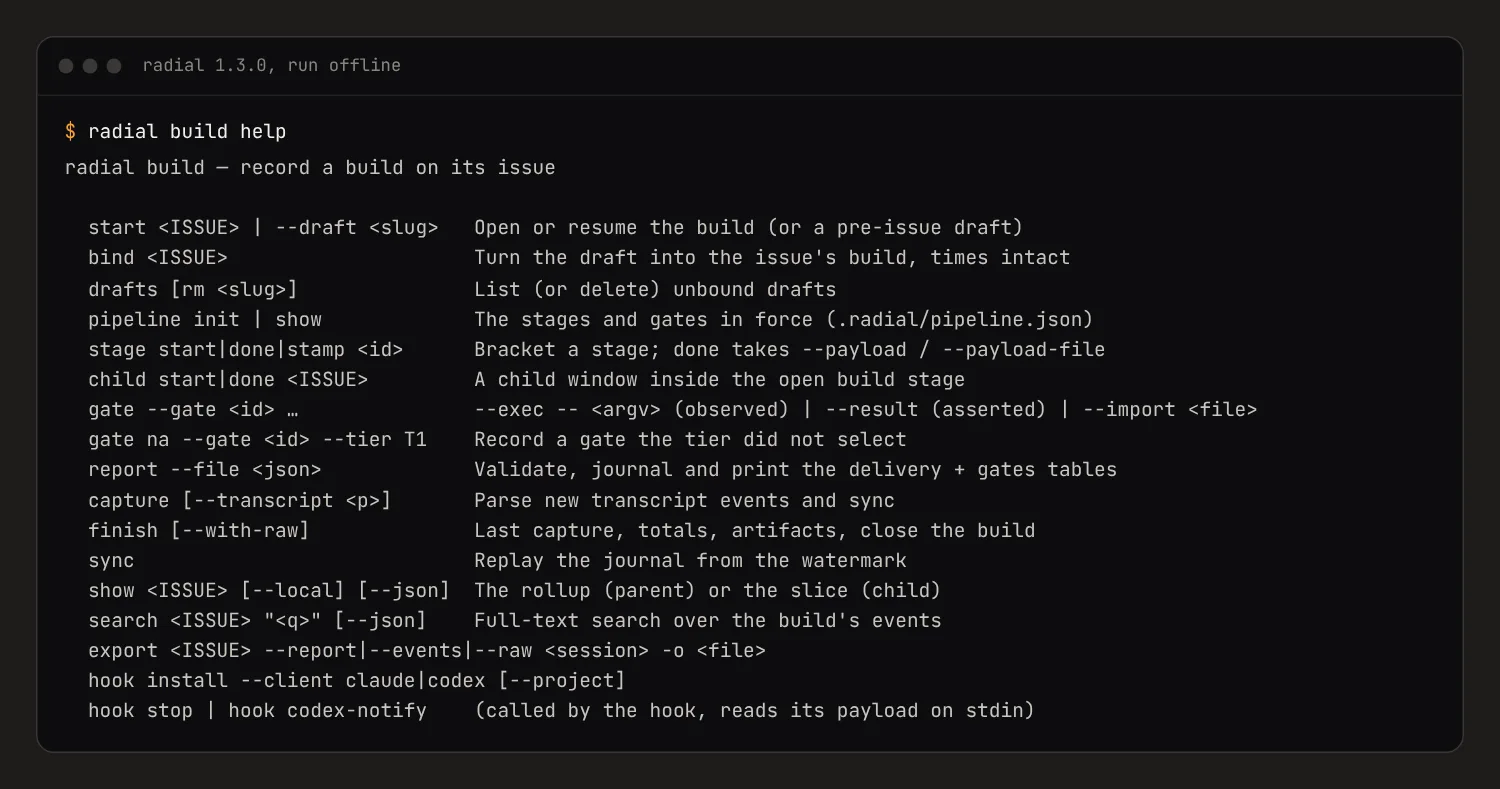
The screenshot above is a terminal running radial build help from CLI 1.3.0, with no account and no network. It lists the full radial build command set: start, bind, drafts, pipeline, stage, child, gate, report, capture, finish (with --with-raw), sync, show, search, export (with --events), and hook install --client claude or --client codex.
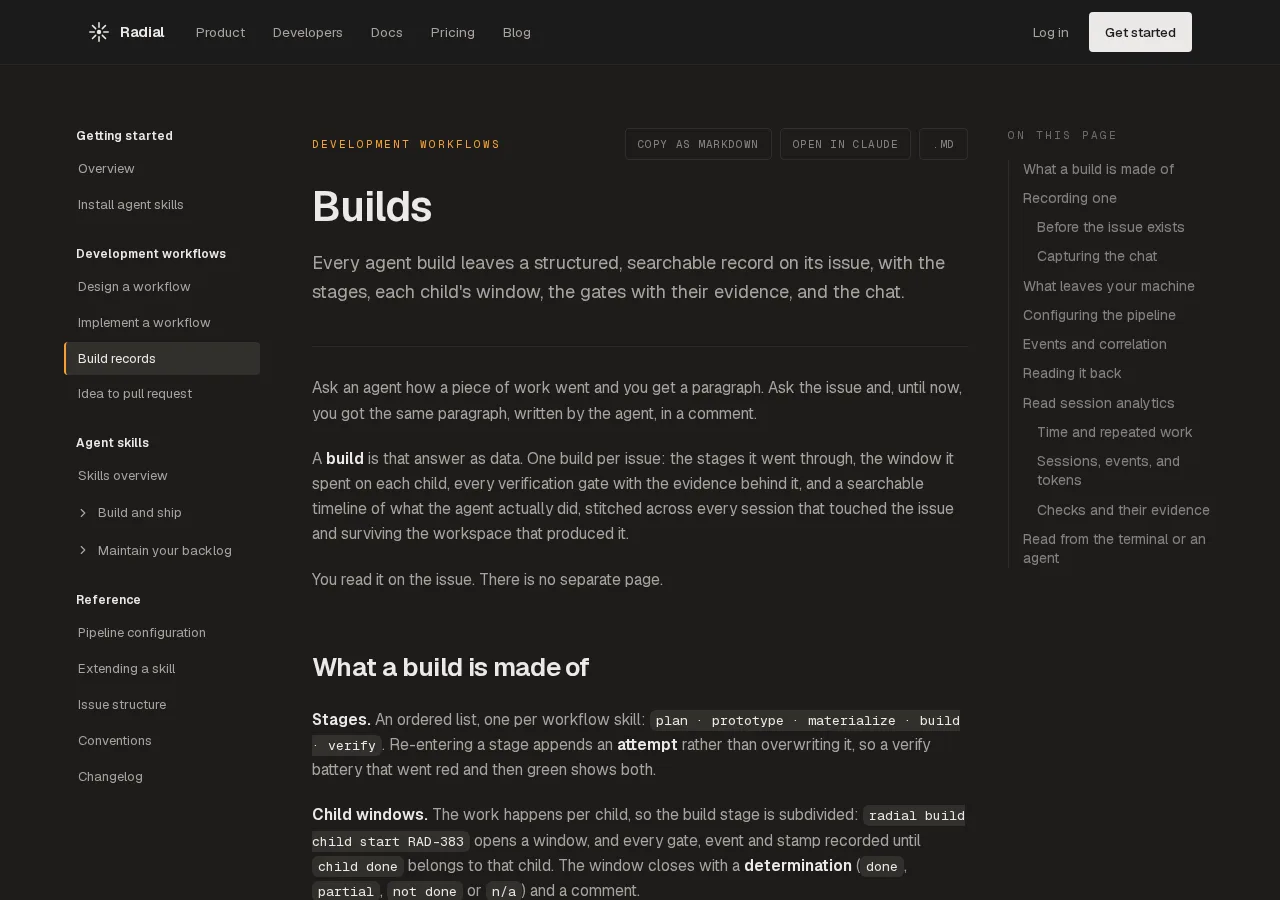
The screenshot above is the Builds page of the Radial docs. It explains that every agent build leaves a structured, searchable record on its issue: stages, child windows, gates with evidence, and the chat. The model behind it is in the builds docs.
#How do I share a Claude Code or Codex session with my team?
Put the session on the issue it worked on, so a teammate finds it from the work instead of asking you for a file. With Radial:
- Install the hook for each agent you run.
radial build hook install --client claudeandradial build hook install --client codex. - Open a build on the issue.
radial build start RAD-219in the checkout where the agent works. - Work. Each turn is redacted on your machine and appended to the issue's build. A session that ran without the hook goes up with
radial build capture --transcript <path-to-session.jsonl>. - Your team reads it. In the web app, the issue's Session tab shows every Claude Code and Codex session that touched the issue. From a terminal:
radial build show RAD-219andradial build search RAD-219 "ECONNRESET". Another agent reads it over MCP withget_buildandsearch_build_events.
Every member of the workspace can read the redacted session; the raw file, uploaded only with radial build finish --with-raw, downloads only for the person whose session it was or a workspace admin. Without a tracker, share the .jsonl file itself (~/.claude/projects/... or ~/.codex/sessions/...), but read it first: it holds everything the agent saw, including any secret it read.
#Keep sessions without a tracker
#Where the logs are
| Agent | Location | Format |
|---|---|---|
| Claude Code | ~/.claude/projects/<encoded-project-path>/<session-id>.jsonl | One JSON object per line: messages, tool calls, tool results |
| Codex CLI | ~/.codex/sessions/YYYY/MM/DD/rollout-<timestamp>-<id>.jsonl | One JSON object per line, starting with a session_meta line |
If you set CLAUDE_CONFIG_DIR or CODEX_HOME, look there instead. Both agents also keep a separate history.jsonl of typed prompts. That is not the transcript.
#Stop Claude Code from deleting them
Claude Code deletes transcripts older than cleanupPeriodDays at startup. The default is 30. Raise it in ~/.claude/settings.json:
{
  "cleanupPeriodDays": 365
}
Run /status in a session to confirm the setting loaded. If your company manages Claude Code settings centrally, its value wins. Codex sessions are not covered by that setting.
#Back them up
rsync -a ~/.claude/projects/ ~/Backups/claude-sessions/
rsync -a ~/.codex/sessions/  ~/Backups/codex-sessions/
Or point restic, Borg or Time Machine at them. Transcripts contain everything the agent saw, including any secret it read from a .env file. Treat a backup like a backup of your shell history.
#Search them
rg -l "ECONNRESET" ~/.claude/projects/ ~/.codex/sessions/
codex resume --all          # Codex's own picker, across projects
claude --resume             # Claude Code's picker for this project
This finds a session. It does not tell you which piece of work the session was for, which is the question you usually have three weeks later.
#A no-tracker baseline: what resuming from files re-reads
Teams that skip a tracker usually keep state in the repo: a TODO.md, a DECISIONS.md, a HANDOFF.md, and local session logs. We scripted that setup and measured it on 2026-11-02. Every number in this section (bytes, timings, tokens and trial results) comes from our scripted baseline harness. The harness, the raw runs and the evidence index are public in BrainGridAI/radial/benchmarks, and each evidence id below links to its raw file. They cover the files-only setup alone, not a comparison with Radial.
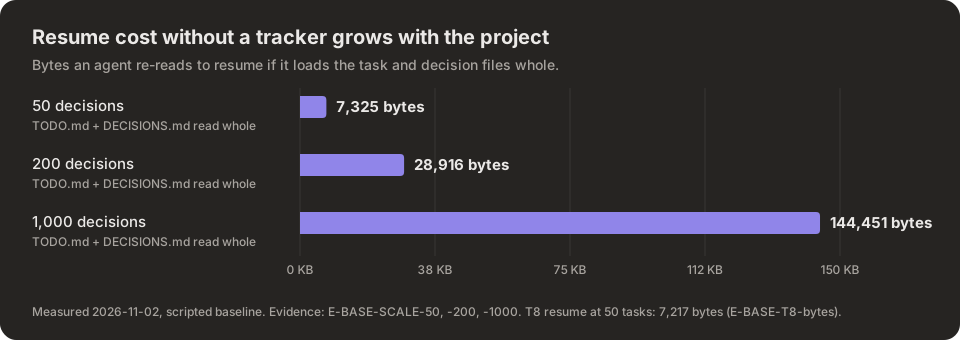
The chart shows the bytes an agent re-reads when it loads the task and decision files whole: 7,325 bytes at 50 decisions, 28,916 at 200 and 144,451 at 1,000, from the scripted baseline on 2026-11-02.
Two byte counts appear below, and they measure different things. "Resume after a session ends" (7,217 bytes) is what the scripted resume step re-feeds with 50 tasks in the repo, across its 6 commands. "Files read whole" (7,325 bytes at 50) is the size of the task and decision files when loaded in full. They are close at 50 by coincidence; only the second grows with every decision.
| Measurement | Value | n | Evidence |
|---|---|---|---|
| Resume after a session ends: bytes re-fed by the resume step, 50 tasks | 7,217 bytes, 6 commands | 10 | E-BASE-T8-bytes |
| Task and decision files read whole: file bytes at 50 / 200 / 1,000 decisions | 7,325 / 28,916 / 144,451 bytes | scripted | E-BASE-SCALE-50, -200, -1000 |
Real agent claims a task from TODO.md: turns | 5 | 3 | E-TOK-BASE-T2-turns |
| Same: input tokens (89% cache reads) | 125,740 | 3 | E-TOK-BASE-T2-in |
| Same: output tokens | 664 | 3 | E-TOK-BASE-T2-out |
| Same: wall-clock | 11.3 s | 3 | E-TOK-BASE-T2-ms |
| Same: cost | $0.071 | 3 | E-TOK-BASE-T2-usd |
Two branches append to TODO.md: merge conflicts | 10 of 10 | 10 | E-BASE-MERGE-both_append_new_task |
| Two agents claim from one checkout: claim silently lost | 20 of 20 | 20 | E-BASE-RACE-shared-lost |
The table as CSV, with the evidence id and run date per row: save-agent-session-logs-baseline.csv.
How to read it:
- Per call, files are cheap. The scripted claim took 35 ms. The real agent took 11.3 s for the same task, so model turns, not the storage, set the pace. We have not measured what a cloud tracker's network round trips add.
- The resume cost grows with the project. An agent that loads the decision log whole pays for every decision ever made, on every session. At 1,000 decisions that is 144,451 bytes before it does any work. Searching a build record (
radial build search) returns only the matching events. - Shared files collide. Two branches that each append a task conflicted 10 of 10 times; two agents claiming from one checkout lost a claim 20 of 20 times, silently.
What we have not measured yet is the same resume through Radial, which needs a live workspace. That run is phase 2. Radial adds a fixed cost of its own: its local MCP server's tool schemas are 12,923 bytes per session (E-RAD-STDIO-toolslist-bytes). That is more than the 7,217-byte file resume at 50 tasks, so for a small project the files cost less; somewhere past 50 decisions the whole-file read overtakes it, but we have not measured where. Until phase 2, this post claims no token saving for Radial.
#Why the cloud copy matters
A transcript on one laptop, unless someone backs it up and shares it, helps one person. A transcript on the issue helps the reviewer deciding whether to merge, the teammate picking up the work tomorrow, and the next agent that reads the issue before it starts. That is the same reason several agents on one repo need a shared tracker rather than a shared folder. If your agents also produce HTML mockups, the same issue can hold them: see how to share coding-agent HTML prototypes. Wiring all of this into a repeatable pipeline is a software factory.
#Methodology
Run 2026-11-02 with git 2.47.3, Python 3.13.5 and Claude Code 2.1.306, Radial commit 9126321.
- Scripted baseline: a scripted agent works a temp git repo holding
TODO.md,DECISIONS.mdandHANDOFF.md. Each task ran n=10; the claim race n=20 per setup; merge cases n=10 each. These measure command counts, bytes and tool time, not model reasoning. - Real agent: Claude Code with Sonnet, asked to claim the next task from
TODO.mdin a fresh seeded directory, n=3. That is below our n=5 bar, so it is labeled n=3 everywhere and should be read as an indication, not a result. All 3 trials succeeded (E-TOK-BASE-T2-ok). No Radial arm was run. - Evidence ids map to raw output files and JSON paths in
evidence.json. The harness scripts, the raw runs andreproduce.share public in BrainGridAI/radial/benchmarks, so every number here can be checked and rerun.
#FAQ
#How do I save and keep my Claude Code session logs so they are not deleted?
Raise cleanupPeriodDays in ~/.claude/settings.json (the default deletes transcripts older than 30 days at startup) and back up ~/.claude/projects/. To keep each session with the work it did, install Radial's hook with radial build hook install --client claude and open a build with radial build start <ISSUE>: every turn is redacted and stored on that issue.
#How do I share a Claude Code or Codex session with my team?
Store it on the issue it worked on. Install Radial's hook for each agent (radial build hook install --client claude or --client codex) and open a build with radial build start <ISSUE>. Teammates read the redacted session in the issue's Session tab, or with radial build show <ISSUE> and radial build search <ISSUE> "<text>". Without a tracker, send the .jsonl transcript, after checking it for secrets.
#Where does Claude Code store session logs?
In ~/.claude/projects/<encoded-project-path>/<session-id>.jsonl, one file per session, unless you set CLAUDE_CONFIG_DIR. Each line is one JSON event: a message, a tool call or a tool result.
#Does Claude Code delete old sessions?
Yes. At startup it deletes transcripts older than cleanupPeriodDays, which defaults to 30 days. Set a larger value in ~/.claude/settings.json and back them up if they matter.
#Where are Codex CLI session transcripts stored?
In ~/.codex/sessions/YYYY/MM/DD/ as rollout-*.jsonl files, or under $CODEX_HOME/sessions/ if you set it. codex resume --all lists them across projects.
#How do I save Claude Code sessions to an issue automatically?
Install Radial's hook with radial build hook install --client claude, then open a build with radial build start RAD-219. Each turn is redacted and appended to that issue's build, and anyone in the workspace reads it in the issue's Session tab.
#How much context does resuming from a TODO file cost an agent?
In our scripted baseline harness (raw runs at github.com/BrainGridAI/radial/tree/main/benchmarks), the resume step re-fed 7,217 bytes with 50 tasks in the repo. Reading the task and decision files whole is a different measure: 7,325 bytes at 50 decisions, growing to 144,451 bytes at 1,000. A real Claude Code agent claiming one task from TODO.md used 5 turns and 125,740 input tokens, for $0.071 (median, n=3, below our n=5 bar). We have not run the same resume through Radial.
#Are secrets in the transcript uploaded?
Radial redacts known secret shapes (private keys, NAME=value secrets, credentialed URLs, Radial keys and tokens, common API keys) on your machine before writing and again on the server before storing. Redaction matches known shapes only, so an unusual secret can slip through, and code, customer data and personal data upload as they are. The raw session file is uploaded only if you pass --with-raw.
#How do I attach an agent transcript to a pull request?
Attach it to the issue the pull request closes, then link the issue in the pull request. The issue is the stable place: a pull request can be closed and reopened as another, but the issue, its build record and its session stay together.
The team behind Radial, the fast, CLI-first issue tracker that lets your own agents work for free. We write about plain software, speed as respect, and bringing your own agent.
Keep reading
Give Claude Code access to your issue tracker in 5 minutes (MCP)
Wire Claude Code to your issue tracker over MCP so your agent files, searches, and closes issues itself. A 5-minute setup, the OAuth flow, and why the durable record belongs where the agent already writes.
How to share an HTML prototype your coding agent built
Claude Code and Codex mock up ideas as single-file HTML. A safe way to get feedback is a link that renders the file in a sandbox next to the issue it belongs to. The options compared, the exact headers Radial sends, what they block and what they do not, and the one-command version.
What is an MCP server? And how to point one at your issue tracker
An MCP server is the thing an AI agent connects to so it can use tools and data outside its own context. Here is what that means, how it differs from a plain API, and how to point one at your issue tracker so your agent files and closes work itself.